
The Affine Transform LAS Point Cloud Task (PCT) is a powerful tool designed to modify the coordinates of LAS point cloud data. It is commonly used for:
- Grid-to-ground conversions
- Local site calibrations
- Debiasing
- Applying horizontal rotation, scale, and translation
This task supports both component-based transformations (Rotate, Scale, Translate) and direct matrix input, making it flexible for a wide range of geospatial workflows.
Parameters
Figure 1: Affine Transform LAS Parameters dialog
Input Datasets
Select the data to which to apply the affine transform.
-
- Feature Geometry - Defines the area to apply the affine transform.
-
Input LAS Layer - Select the points within the dataset to use in the processing.
-
- Input Points Filter - Opens the Live View to allow filtering of which points to use from the input LAS Layer.
-
Transformation Settings
Figure 2: Rotate, Scale, Translate and Origin settings
-
Rotate: Specify rotation angles (typically in degrees) around the X, Y, or Z axis.
- Select the order the axis of rotation, "X,Y,Z" or "Z, Y, X". The latter is the default.
- Scale: Enter scale factors for each axis.
- Translate: Input translation values to shift the point cloud.
- Origin: Define the origin point for rotation and scaling operations.
Matrix Settings
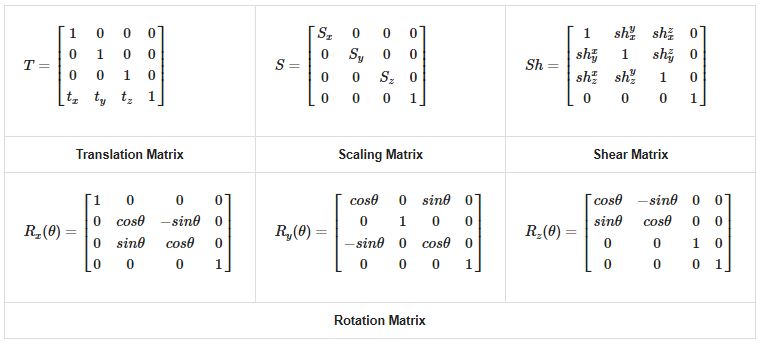
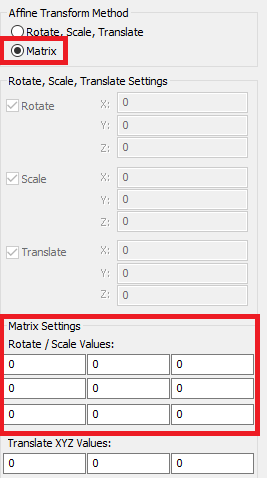
- If you prefer matrix math, input the 3x3 transformation matrix and translation vector directly.
- LP360 will auto-calculate the matrix from component inputs if both are used.
Output Settings
- Output Folder: Select an output location to write the transformed LAS dataset.
- Output Layer Name: Introduced in 2025.2, the user may specify the name for the corrected LAS Layer, for example, "Debiased LAS" or "Local LAS", in place of the default name, "<Default>", where the legacy auto-naming convention is used, "LAS_Layer#".
- Maintain Source File Structure: Keeps the original tiling of LAS files. Each output file maps one-to-one with its source.
- GeoTag as Local SRS: Tags the output LAS files with a local Spatial Reference System (SRS) aka local Coordinate Reference System (CRS), including the units (e.g., survey feet, meters), indicating they are in a non-standard or arbitrary Local Coordinate System (LCS).
Workflow: Applying Affine Transform LAS PCT
-
Create the Task:
- In LP360, go to the Point Cloud Task Manager
.
- Add a new task and select Affine Transform LAS as the type.
- In LP360, go to the Point Cloud Task Manager
-
Configure Parameters:
- Input Rotate, Scale, Translate values or use matrix input.
- Set the origin if needed.
-
Run the Task:
- Execute the task using the Point Task tab.
- Verify the output using visual inspection or control points.
-
Export the Task:
- Save the task as an XML file for reuse or batch processing.
- Ensure only the Affine Transform PCT is selected during export.
📎 Tips & Resources
- Use TerraScan for deriving transformation values from control point pairings.
Comments
0 comments
Please sign in to leave a comment.